Elliott Wave, made practical
Learn what PriceLens AI is showing, why each level matters, and when the market has changed the story. You do not need to label every wave before using the forecast.
Elliott Wave is one structural input inside a broader probabilistic forecast. Every count is a scenario that can be revised.
- 1Choose a view
Pick the amount of detail that helps you decide.
- 2Read risk first
Find invalidation before evaluating targets.
- 3Use zones, not exact prices
Treat every box as an area for reaction.
Easy vs Expert
Choose the detail level that helps you decide
For generated market forecasts, Easy Analysis and Expert Analysis use the same completed result. Switching views changes the explanation, not the underlying count, and does not rerun the forecast or use your monthly allowance. Screenshot Reading uses its own dedicated result view.
Choose how market structure enters PriceLens AI.
Choose how much result detail you want.
Automated Mode searches live market data and detects the pivots. Manual Mode lets experienced users enter pivots and optionally force a pattern or wave-degree label. Generated market forecasts automatically use the display degree assigned to their timeframe. Manual Mode's default Neutral Minor setting, and Screenshot Reading, use neutral Minor notation because those inputs have no intrinsic market timeframe. To display a screenshot count at another supported degree, apply that count in Manual Mode and choose the degree there. For either generated market forecast, the separate Easy/Expert switch controls only result detail. Screenshot Reading is a separate upload flow with its own dedicated result view.
Clear decision summary
Easy Analysis
Use Easy when you want the active scenario in plain language and the few levels that matter now.
- Quick takeThe pattern, next expected move, and how settled the read looks.
- What the app is watching nextThe next target, support, or resistance area.
- Right nowWhere current price sits relative to the active area.
- When this read is wrongThe boundary that weakens or invalidates the setup.
Audit the Elliott logic
Expert Analysis
Use Expert when you want to validate the structure, compare alternatives, or inspect exact levels.
- Pattern ranking and fitWhy the primary count ranked above nearby alternatives.
- Exact Fibonacci frameworkThe relationships used to build the active zone.
- Primary and alternate countsThe leading interpretation and strongest competing risk.
- Technical notices and contextStructural caveats, timeframe relationships, and supporting overlays.
Read Your Forecast
Read the result in five passes
Do not begin with the most exciting target. Confirm the forecast identity, understand the present setup, then compare reward with the level that proves the setup wrong.
- Confirm the ticker, listing, and timeframe.A correct read on the wrong market or horizon is still the wrong decision input.
- Read the Quick take or current stage.Identify whether the move is directional, a pullback, or a terminal test.
- Locate current price against the active box.Price below, inside, or beyond the box can imply different setups.
- Find invalidation before targets.This is where the active count or trade setup needs a fresh read.
- Check alternatives, context, and confidence.Nearby alternates or timeframe disagreement mean the structure is less settled.
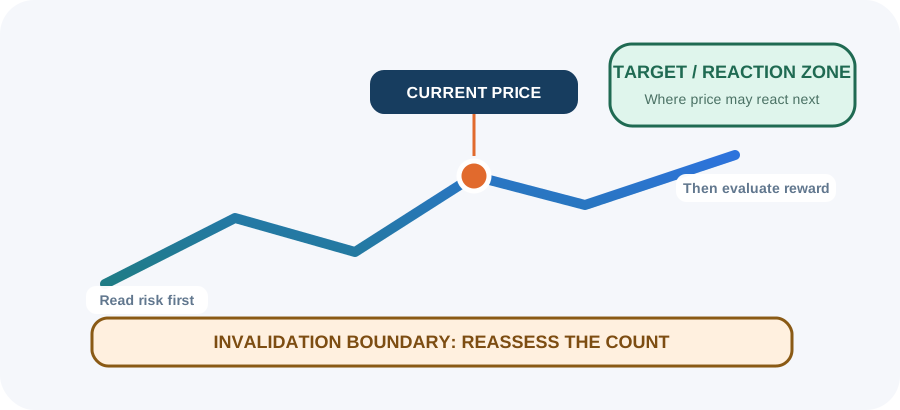
Completed pivots used by the count.
The latest available market position.
The nearest actionable support, resistance, or target area.
A later step that matters only if earlier steps hold.
The count boundary, not a target.
Meaning: The active pattern, likely next move, and current clarity.
Useful for: Orienting yourself before reading individual levels.
Meaning: Confirmed pivots, active boxes, invalidation, and the conditional roadmap for the primary count.
Useful for: Seeing sequence and price location together. On mobile, expand it and rotate to landscape.
Meaning: A Buy or Sell setup pairs direction with a target and risk-side stop; Hold can mean no defensible directional setup exists.
Useful for: Summarizing trader action. It is not simply the direction of the larger Elliott count.
Meaning: The leading structure and the strongest other plausible interpretation.
Useful for: Knowing what could replace the primary count if price behaves differently.
Meaning: A comparative structural score based on the supplied pivots and Elliott guidelines.
Useful for: Understanding why one pattern ranked above another. Fit is not a profit probability.
Meaning: The exact retracement or extension relationships behind the projected zone.
Useful for: Auditing the price math and planning alerts around a range.
Meaning: Larger trend structure and smaller internal subdivisions around the active count.
Useful for: Distinguishing a local pullback from a broader trend change.
Meaning: Plan- and data-dependent overlays that may support, conflict with, or remain neutral to the technical path.
Useful for: Finding non-technical agreement without replacing Elliott invalidation.
Meaning: The market series and pivots used to build the live study.
Useful for: Checking whether the chosen swings make sense on the underlying history.
Meaning: Follow-up questions grounded in the current result.
Useful for: Asking “What price makes this count wrong?” or “Why is the alternate still plausible?”
Interpret Carefully
Confidence, Fit, and Recommendation are different signals
They answer different questions. None of them is a guaranteed probability of profit.
How clear and internally consistent the current read appears. Use it to size uncertainty, not to predict a win rate.
How well a candidate pattern compares with the pivots and structural guidelines. Use it to compare counts, not investments.
The trader-action setup at current price. A directional Buy or Sell requires a target and risk-side stop; Hold can signal that no clean directional setup exists.
A clean count can still fail. Market gaps, new information, stale data, and fast volatility can cross levels before you can act.
Elliott Basics
Impulse: five waves in the trend direction
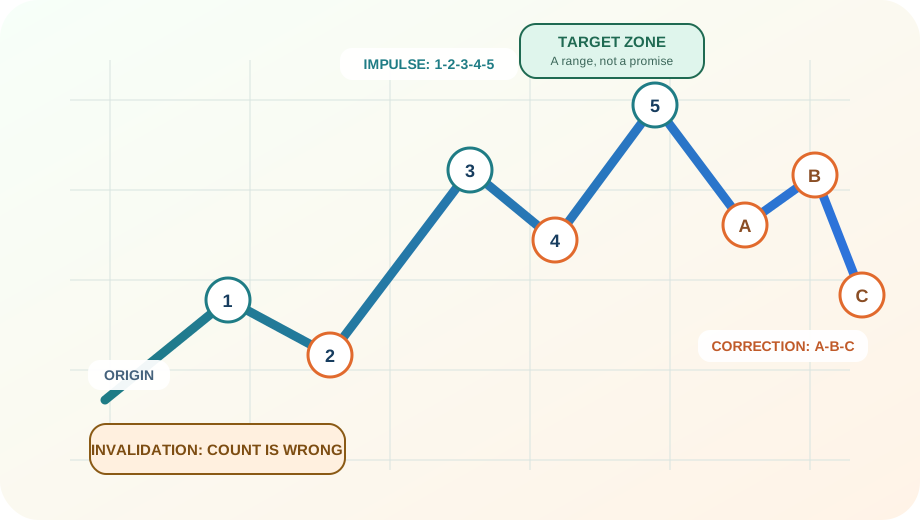
A standard impulse has five waves. This teaching example uses Minor-degree 1-2-3-4-5 notation: Waves 1, 3, and 5 move with the larger trend; Waves 2 and 4 pause or retrace that progress.
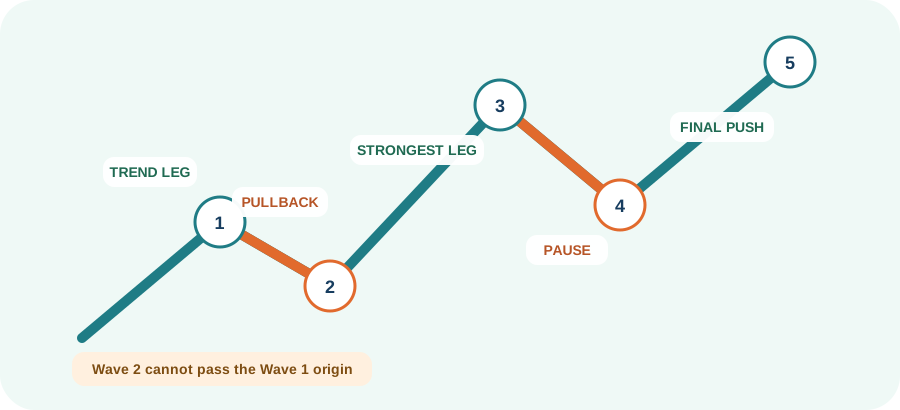
The first directional move, often recognized after the first pullback starts.
A retracement of Wave 1. It must not move beyond the Wave 1 origin.
Often the strongest leg. It cannot be the shortest of Waves 1, 3, and 5.
A later pause. In a standard impulse it usually stays outside Wave 1 territory.
The final push. Momentum may weaken while price reaches a new extreme.
Wave 4 overlap is normally invalid in a standard impulse, but it can be valid inside a correctly formed leading or ending diagonal. Read the pattern label before applying the rule.
Elliott Basics
Correction: movement against the prior trend
Corrections are resets, not automatically reversals. A-B-C is a clear three-part structure; W-X-Y links two corrective structures when the market needs more time or complexity. These uppercase labels are the Minor-degree form used in this teaching example.
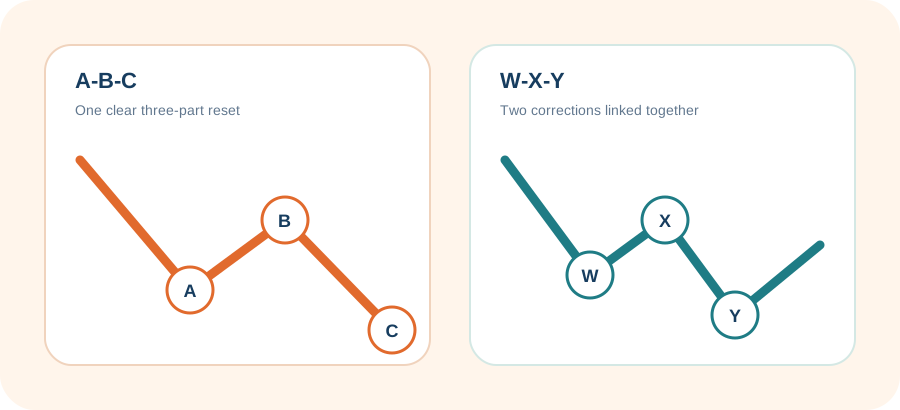
A-B-C
Use this label when the countertrend move has a clear three-part structure.
- A moves from the prior trend extreme.
- B retraces part of A.
- C resumes the correction.
W-X-Y
Use this label when two corrective structures are connected by an X wave.
- W is the first correction.
- X is the connecting retracement.
- Y is the second correction.
Risk First
Invalidation is the boundary that changes the count
Invalidation is not a price objective. If price crosses the count boundary, the active structure should be replaced, re-anchored, or demoted below an alternate.
Where the Elliott interpretation is structurally wrong.
The risk-side level used by the current Buy/Sell setup.
The boundary where reward is evaluated, not where the count becomes invalid.
Price can trade inside a support, resistance, or target zone while the count remains valid. Use the exact invalidation label shown for the active pattern.
Timeframes and Degree
Different horizons can be right at the same time
A one-month chart can show a pullback while a one-year chart still shows a larger uptrend. Wave degree describes how smaller structures sit inside larger ones. PriceLens uses one stable display degree for each generated-market timeframe so linked labels remain visually distinct.
This is the stable PriceLens display convention, not a universal rule that elapsed calendar time determines Elliott degree. The 5 Years chart therefore keeps Intermediate notation; PriceLens does not promote it to Primary, Cycle, Supercycle, or Grand Supercycle merely because the chart spans five years.
Typography identifies degree
Parentheses, capitalization, and Arabic versus lowercase Roman numerals are part of the degree label, not a confidence signal. Compare Intermediate (1) and (A), Minor 1 and A, Minute i and a, and Minuette (i) and (a). A trailing ? alone marks the whole checkpoint as tentative.
A slash is one checkpoint
A label such as 6M a/i? is one tentative checkpoint with two plausible roles, not two boxes. The left-hand label is the current lead and the right-hand label is the alternate, so a/i? and i/a? preserve different interpretation priority. The word tested means price already traded at that checkpoint.
Each 1 Month, 6 Months, 1 Year, and 5 Years panel retains its own notation. When one linked badge names several scoped views, segments stay in shorter-to-longer order and each segment keeps its own degree—for example, 1M (ii)/(b)? | 6M ii/b? | 1Y 2/B? | 5Y (2)/(B)?.
A larger timeframe can support or challenge a shorter setup. It does not erase a valid local structure simply because labels use a different wave degree.
Practical Workflow
Before, during, and after a forecast
Set up the right study
- Confirm the ticker and exact listing.
- Choose the decision horizon, not the most dramatic chart.
- Use Automated for live detection; use Manual only when you can defend your pivots.
Read risk before reward
- Start in Easy, then inspect Expert if needed.
- Compare current price with the active box.
- Pair a Buy or Sell recommendation with its target and action stop; Hold may mean no defensible directional setup exists.
Know when the read is stale
- Rerun after invalidation or a consumed target.
- Rerun when your ticker or timeframe decision changes.
- Treat a restored saved forecast as a snapshot, not a fresh market request.
Glossary
Terms used in PriceLens AI
- Active box
- The nearest support, resistance, target, or invalidation zone relevant to the current stage.
- Alternate count
- A second structurally plausible interpretation of the same price data.
- Confidence
- A clarity and reliability indicator, not a guaranteed profit probability.
- Fit
- A comparative pattern score based on the supplied pivots and Elliott guidelines.
- Invalidation
- The structural boundary that makes the active count wrong.
- Pivot
- A confirmed swing high or low used to construct the wave structure.
- Projection zone
- A price range where the next wave may complete or react.
- Roadmap
- A conditional sequence of later zones that matters only if earlier steps hold.
- Wave degree
- The relative size of a wave structure inside a larger or smaller move. PriceLens displays Minuette on 1 Month, Minute on 6 Months, Minor on 1 Year, and Intermediate on 5 Years.
- Slash label
- Two plausible Elliott roles for one checkpoint. The left role is the current lead and the right role is the alternate; it is not a second box.
- Tentative / tested
- A trailing ? marks a tentative checkpoint. Tested means price already traded at that checkpoint rather than leaving it as a wholly future target.
- Recommendation
- The current action setup, which can differ from the larger count direction.
Explore the tools
More PriceLens guides
Learn what each workflow offers and where its limits matter.
Important
Forecasts are scenarios, not financial advice
PriceLens AI is an educational market-analysis product. Elliott Wave counts can be revised, data can be incomplete, and targets can fail. Use independent research and risk controls.
Open the Forecast Workspace